
The Hotline Bling AI trend, explained
The 2015 light-box dance is back, with you in it. Here is what the AI versions are, why the outfit changes at every cut, which apps make them, and how to do it in five minutes.
By Hotline Bling AI · Last updated
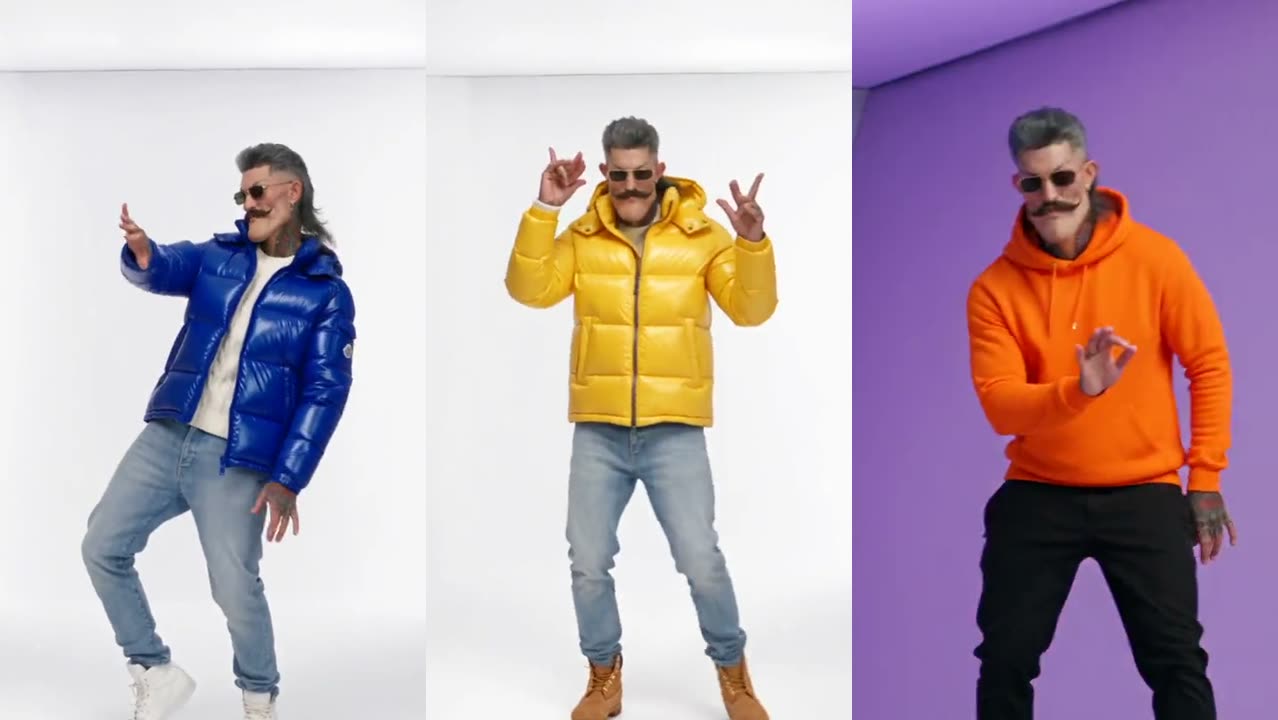
What are the AI Hotline Bling videos everyone is posting?
The AI Hotline Bling videos are recreations of the dance from the 2015 video. A single person dances alone in empty rooms whose walls glow one flat color at a time: pink, orange, purple, blue, cyan, green. In the AI version, that person is the creator, a friend, a pet or a cartoon character instead of Drake.
Most versions follow the same recipe. The clip is vertical, lasts 15 to 18 seconds and plays the song. The dancer copies the loose side-to-side moves of the original. Many versions add a quick costume change at every cut: a turtleneck, then a puffer jacket, then a hoodie, so the clip plays like a fast fashion edit.
How do you do the trend with your own photo?
Doing the trend with your own photo takes about five minutes and no dancing. With the AI Hotline Bling video maker on this site the steps are:
- Pick a clip. The 18-second original has 7 shots; the 17-second Pt 2 has 5 shots, including the long corridor and the white staircase.
- Upload one photo. One person, facing the camera, head to waist in frame, without sunglasses.
- Press Generate at 480p, 720p or 1080p (100 credits at Standard (480p), 200 at HD (720p) or 600 at Full HD (1080p)). The MP4 is ready in a few minutes, vertical and with the song.
The full walkthrough, with fixes for a face that drifts or a video that posts silent, is in how to make the Hotline Bling video with AI.
Why does the outfit change at every cut?
The outfit changes at every cut because the trend copies the wardrobe changes of the original video. In the 2015 video Drake switches outfits between scenes, from a turtleneck to puffer jackets and sweaters. The AI versions push that further and give each shot its own look. In the 18-second template on this site the dancer goes from your own clothes to a cream turtleneck, a cobalt puffer, a green hoodie, a mustard puffer, a silver puffer and an orange hoodie.
Which apps make the Hotline Bling trend video?
Several AI video sites offer a ready-made Hotline Bling template, and they differ in clip length, number of photos and price. This table lists only what each maker’s own page or search listing states:
| Tool | Photos | Length | Price |
|---|---|---|---|
| Hotline Bling AI | One photo of one adult | 18 s or 17 s | 100 credits per video at 480p; packs from $12.90 for 100 credits, no subscription |
| Kapwing | One photo | 15 s | Not stated on the template page; Kapwing sells monthly plans |
| Starrd | One photo (pets work too) | 18 s (Pt 2: 17 s) | 200 Starrd credits per video; packs start at $4.99 for 100 credits on the web |
| EAST.IM | Two photos | 15 s | Not stated in its search listing |
| Media.io | One photo | Depends on the workflow you pick | Not stated in its search listing |
| Magic Hour | One face photo | GIF length | Not stated in its search listing |
Which one fits depends on the video you want: a duet needs a two-photo tool, a GIF of the meme needs a face swap. The longer comparison is in the best Hotline Bling video generators.
When did the Hotline Bling AI wave start?
The AI wave started in autumn 2026, about eleven years after the original video came out on October 19, 2015. By October 2026 template sites such as Summrs and Starrd were publishing step-by-step guides, and TikTok tutorials titled “how to make the Drake Hotline Bling AI trend” were collecting views in November 2026.
Is it OK to post an AI video of a friend?
Posting an AI video of a friend is fine when the friend is an adult and has agreed to it. Do not use photos of children, celebrities or strangers. TikTok asks creators to label realistic AI-generated content, so switch on the AI-generated label when you post. Each platform’s rules for AI content are linked under Sources.